How to structure an AI-native repo that works with any model
Most teams that adopt coding agents end up with the same mess: one instructions file per tool, each slightly different, and the rules that really matter living in somebody's chat history. Here's a layout that fixes it. It gives any agent what it needs to do good work, and it still works when you switch models next year.
The idea: one source of truth, a thin adapter per tool
Every agent tool wants its own file. If your real guidance lives in one vendor's file, switching models means rewriting it, and running two tools at once means keeping two copies in sync. Nobody keeps two copies in sync.
So put the guidance in files no vendor owns, and give each tool a one-line pointer to them. Swapping a model then costs you one new pointer, not a rewrite. Here's the whole layout:
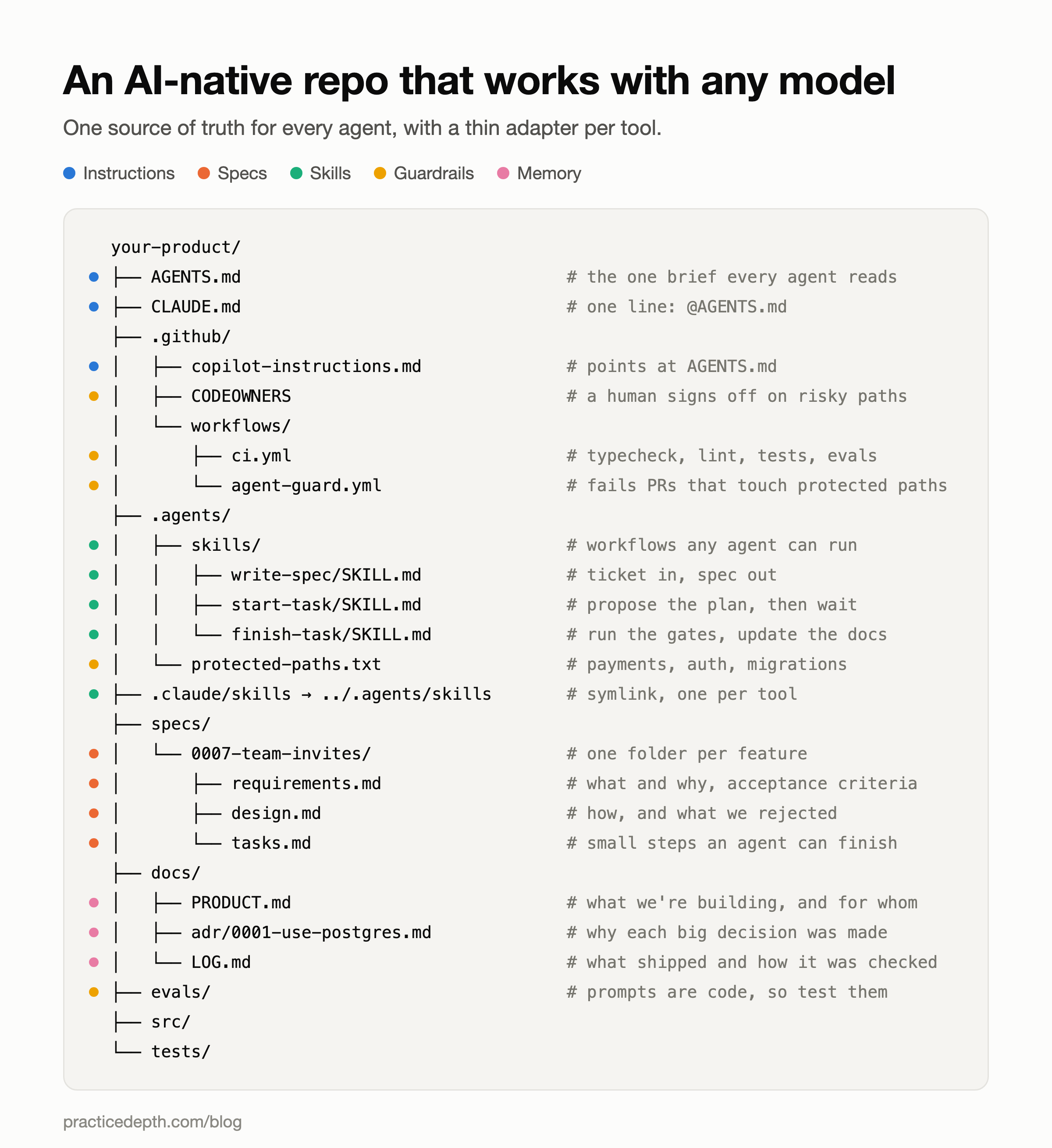
Each layer does a different job, and they fail in different ways, so it's worth taking them one at a time.
Layer 1: instructions (AGENTS.md)
AGENTS.md has become the shared convention. Codex, Cursor, Copilot, Zed and most other agent tools read it from the repo root without any setup. Claude Code reads CLAUDE.md instead, but that file can import another one with an @ line, so it shrinks to a single line:
<!-- Everything lives in AGENTS.md. Edit that file, not this one. -->
@AGENTS.md.github/copilot-instructions.md gets the same treatment.AGENTS.md itself is a briefing for a capable new hire who has never seen the codebase. What it is, how to run it, how the team works, and the handful of rules that can't bend:
# AGENTS.md

## What this is
A booking app for independent physiotherapists. Next.js and Postgres.
Who it's for: docs/PRODUCT.md. Why it's built this way: docs/adr/.

## Commands
- `npm run dev`: local server on :3000
- `npm test`: unit tests, must pass before any commit
- `npm run typecheck && npm run lint`

## How we work
- Non-trivial work starts from a spec in specs/. No spec yet? Write one (skill: write-spec).
- Propose a plan and wait for approval before writing code (skill: start-task).
- Bugs: write the failing test first, then fix it.
- One task from tasks.md per commit.

## Rules
- Never edit anything in .agents/protected-paths.txt. Stop and explain what would need to change.
- Never commit secrets or .env files.
- Changing an architecture decision means a new ADR, never editing an old one.

## Things not to "fix" without asking
- `retryWithBackoff` stops at 2 retries on purpose. See ADR-0012.
- The row lock in `reserveSlot` looks redundant. It isn't: without it, two requests can book the same slot.
Keep it short. Every line competes for the model's attention with the task in front of it, and a rule buried at line 900 may as well not exist. If a rule only matters in one folder, put a smaller AGENTS.md in that folder. Tools that support nesting read the nearest one.
Layer 2: specs (specs/)
Instructions tell an agent how your team works. A spec tells it what to build this time. Hand an agent a one-line ticket and it fills every gap with a guess. Hand it a spec and those guesses become decisions a human already made.
Use one folder per feature, numbered so they sort in the order you built them, with three files inside. It's the same split that spec-driven tools like Kiro and GitHub's Spec Kit use, and it works just as well by hand:
- requirements.md: the problem, who has it, acceptance criteria, and what's out of scope.
- design.md: how you'll build it, the data model, and the options you rejected with a line on why.
- tasks.md: the build broken into steps small enough for an agent to finish and a human to review in one sitting.
# 0007: Team invites

## Problem
Clinic owners share one login with their staff, so there's no record
of who changed a booking, and a leaver keeps access.

## Acceptance criteria
- An owner can invite a colleague by email as Admin or Member.
- An invite expires after 7 days and can be cancelled before it's accepted.
- A Member sees only the calendars they're assigned.
- Accepting requires signing in with the invited email address.

## Out of scope
- Bulk invites
- Custom roles# Tasks: 0007 Team invites
- [ ] 1. Migration: invite table (email, role, expiresAt, acceptedAt). Additive only.
- [ ] 2. createInvite and the email. Test: an expired invite can't be accepted.
- [ ] 3. Accept flow. Test: a different signed-in email is rejected.
- [ ] 4. Member scoping on calendar reads. Test: a Member can't read an unassigned calendar.
- [ ] 5. Settings page UI.Notice that every task names its test. That's what "small enough" means in practice: the agent can finish the task, prove it works, and you can check the proof.
Specs have to stay alive. When the design changes during the build, update design.md in the same commit. A spec that has drifted from the code is worse than no spec, because the next agent will trust it.
Layer 3: skills (.agents/skills/)
A skill is a workflow you write down once instead of explaining in every chat. It's a folder with a SKILL.md inside: a short frontmatter block with a name and a description, then plain instructions. The agent only sees the descriptions up front and loads a full skill when the task matches, so you can have dozens without bloating every request. The format was published as an open standard in late 2025, and most major agent tools now read it.
---
name: start-task
description: Plan a task before writing code. Use when starting any task from specs/*/tasks.md, or when asked to "start", "plan this" or "pick up the next task".
---

# Start a task

1. Read the spec folder: requirements.md, design.md, tasks.md.
2. Take the first unchecked task. Don't skip ahead.
3. Read the code it touches and any ADR it mentions.
4. Reply with:
   - **What** you'll change, file by file.
   - **How** you'll test it, naming the test that should fail first.
   - **Risks**: anything in .agents/protected-paths.txt, any migration, any public API.
5. Stop. Don't write code until a human approves the plan.To keep a skill portable, put only name and description in the frontmatter. Tools add their own extra fields, and the others ignore them, so a skill that depends on one only works in one tool.
.agents/skills/ is becoming the neutral folder that several tools read. For a tool that only looks in its own folder, a symlink does the job:
ln -s ../.agents/skills .claude/skillsThree skills are worth writing first. write-spec turns a ticket into the three spec files. start-task is the plan-then-wait step above. finish-task is a checklist: run typecheck, lint and tests, tick the task, update the spec and the log, then make one commit.
Layer 4: guardrails (enforced by CI, not the prompt)
This is the layer most teams skip, and it's the one that matters most. A rule in AGENTS.md is a request. Models follow it most of the time. "Most of the time" is fine for code style and not fine for your billing code.
So the rules that must hold get enforced by something that doesn't read prompts at all: a list of protected paths, and a CI check that fails any agent-written pull request that touches them.
# Humans only. An agent that needs a change here stops and explains why.
src/billing/
src/auth/session.ts
prisma/migrations/
.github/name: Agent guard
on: pull_request
jobs:
guard:
if: startsWith(github.head_ref, 'agent/')
runs-on: ubuntu-latest
steps:
- uses: actions/checkout@v4
with:
fetch-depth: 0
- name: Fail if a protected path changed
run: |
patterns=$(grep -v '^#' .agents/protected-paths.txt | sed '/^$/d')
changed=$(git diff --name-only origin/${{ github.base_ref }}...HEAD)
hits=$(echo "$changed" | grep -F "$patterns" || true)
if [ -n "$hits" ]; then
echo "This agent PR touches protected paths:"
echo "$hits"
exit 1
fiPair it with a CODEOWNERS entry on the same paths, so a human review is required even on a PR the check lets through. None of this depends on which model wrote the code, and that's the point. Guardrails in a prompt have to be rewritten and re-tested for every model. Guardrails in CI work for all of them.
If your product calls a model, evals/ belongs in this layer too. A prompt is code that runs in production, and changing one without a test means shipping untested code. Twenty recorded inputs, each with a few properties the output must have, catch most regressions. Our AI engineering interview questions guide covers how interviewers probe exactly this.
Layer 5: memory (docs/)
An agent starts every session knowing nothing about yesterday. Whatever your team learned has to be written somewhere it will read. Three files carry most of it:
- PRODUCT.md: who the product is for, what it does, and what it deliberately doesn't do.
- adr/: one short Architecture Decision Record per significant decision.
- LOG.md: what shipped, how it was verified, and anything surprising that happened along the way.
# ADR-0004: Postgres for bookings, not a document store

Status: Accepted

## Context
Bookings need "no two appointments in one slot" to hold under concurrent requests.

## Decision
Postgres, with a row lock when reserving a slot.

## Alternatives considered
- Document store: simpler schema, but no transaction across slot and booking.
- Redis lock: fast, but a second system that has to agree with the database.

## Consequences
Every booking write goes through reserveSlot. Migrations are additive only.ADRs are the most underrated file in the repo. When an agent suggests swapping your database for something shinier, the ADR is what tells it the question was already weighed, and what was given up. Writing the alternatives down is the same skill interviewers test when they ask you to talk through a trade-off.
Swapping models: what actually changes
With this layout, moving to a new tool or running two side by side touches almost nothing:
- Tools that read AGENTS.md natively (Codex, Cursor, Zed and most others): nothing to add.
- Claude Code:
CLAUDE.mdcontaining@AGENTS.md, plus the.claude/skillssymlink. - Copilot:
.github/copilot-instructions.mdpointing atAGENTS.md. - MCP tool servers: the one piece that isn't standard yet. Each tool keeps its own config file in its own format, so expect to maintain one per tool.
Tool support moves monthly, so check each tool's docs when you set it up. The layout doesn't need to change when they do. Only the adapters do.
Mistakes that undo the whole thing
- An AGENTS.md that grows to 2,000 lines. Move workflows into skills and folder-specific rules into nested files.
- Rules that only live in chat. If you've corrected the agent twice on the same thing, it belongs in
AGENTS.mdor a skill. - Copying guidance into each tool's file "just this once". Two copies drift apart within a week.
- Guardrails that are only polite requests. If breaking the rule would cost money or data, CI enforces it.
- Specs nobody updates. A stale spec misleads the next agent with total confidence.
Set it up in an afternoon
- Move whatever is in your existing tool-specific files into
AGENTS.md, and replace the originals with pointers. - Write
protected-paths.txtand the guard workflow. This is the step that actually protects you. - Write the
start-taskandfinish-taskskills. - Write one spec for the next feature before anyone, human or agent, writes code for it.
- Start
docs/adr/andLOG.md, and add to them as decisions happen.
mkdir -p .agents/skills/{write-spec,start-task,finish-task} specs docs/adr evals .github/workflows .claude
touch AGENTS.md docs/PRODUCT.md docs/LOG.md .agents/protected-paths.txt
echo "@AGENTS.md" > CLAUDE.md
ln -s ../.agents/skills .claude/skillsWhy interviewers are starting to ask about this
Teams that build with agents now ask candidates how they work with them, and the gap between answers is wide. One answer names tools. The other describes a system.
How does your team work with AI coding agents?
Junior answer
We use Cursor and Claude a lot. They write most of the boilerplate and we review the PRs before merging.
Senior answer
Every agent reads one AGENTS.md, so switching tools doesn't lose anything. Anything non-trivial starts from a spec with acceptance criteria and small tasks, each with its own test. The rules that can't bend, like billing and migrations, aren't in the prompt at all: CI fails any agent PR that touches them and CODEOWNERS requires a human. The agent proposes a plan, a human approves it, and the PR stays small enough to actually review.
The follow-up is nearly always "what happens when the agent ignores your instructions?" The senior answer already covered it.
That follow-up is where most answers fall apart, and it's worth practising out loud. Our guide to surviving the follow-up question covers how to handle the second and third "why".
Common questions
Do I need both AGENTS.md and CLAUDE.md?
Keep the content in AGENTS.md and make CLAUDE.md a one-line import of it. You get one file to maintain and every tool still finds what it looks for.
Should specs be committed to the repo?
Yes. A spec in a ticket tracker is invisible to the agent doing the work. In the repo, it's versioned with the code it describes, and a pull request can update both together.
Is this overkill for a solo developer?
Start with AGENTS.md and the protected-paths guard. Those two pay off immediately. Add specs when a feature takes more than a day, and ADRs the first time you catch yourself re-arguing a decision.
Does this replace code review?
No. It makes review possible. Small tasks with named tests produce pull requests a person can actually read, and the guard decides which ones a person must read.